|
This page contains instructions on how to enter the dealer mode.
You will want to put the bike into dealer mode if the "FI" Fault Indicator LED is lit and "FI" is flashing in the display under the speedo. Dealer mode will let you read off a fault code so you can trace the fault. I have a list of all the ECU fault codes here.
Dealer mode is also used to check the Throttle Position Position (TPS) too. The TPS setting is very important for an engine to run smoothly and fuel properly.
The dealer mode plug is on the left hand side of the bike at the back. You may have to remove the left hand side rear fairing to get to it the first time. I have mine inside the trunk area for easy access.
The Black / White trace is a ground. It's not a problem using a bare paper clip, it doesn't matter if it accidentally contacts the frame etc.
The manual has more information on setting the TPS. You can download it from my page here!
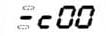
Dealer Mode LED display. The Bar should be in the middle postion at ~1200rpm idle speed.
|

Dealer Mode LED display. The bar should be at the top at 1400rpm or more.
|
|